Redirects are invisible when they work and expensive when they don't. A redirect chain adds a round trip per hop, a wrong 302 can stop search engines passing signals to the new URL, and a loop takes the page down entirely. After any migration, domain change or URL restructure, checking redirects should be on the list.
The status codes you'll actually see
| Code | Meaning | Use it when |
|---|---|---|
| 200 | OK | The page exists and this is it |
| 301 | Moved permanently | A URL has changed for good (migrations, HTTPS, renamed pages) |
| 308 | Permanent redirect, method preserved | Like 301, but a POST stays a POST |
| 302 / 307 | Temporary redirect | Short-term moves: maintenance, A/B tests, login redirects |
| 304 | Not modified | The browser's cached copy is still valid |
| 404 | Not found | The page doesn't exist |
| 410 | Gone | The page was removed deliberately and won't come back |
| 500 / 503 | Server error / unavailable | Something broke, or the site is down for maintenance |
Web Developer Tools' HTTP Status Code Lookup explains any code you meet, including the rare ones.
Check a URL's redirects
In DevTools
- 1
Open the Network panel
Tick Preserve log so requests aren't cleared when the page navigates.
- 2
Load the old URL
Paste it into the address bar and press Enter.
- 3
Read the first rows
Each redirect appears as its own row with a 3xx status. Click one and check the Location response header to see where it points.
With curl
# Follow redirects and print each hop's status line and Location
curl -sIL https://example.com/old-page | grep -iE "^(HTTP|location)"
-I asks for headers only, -L follows redirects.With an extension
In Web Developer Tools, Redirect Checker shows the full chain for the current URL, Detect Redirects flags redirected resources the page loads, and View HTTP Response Headers shows the final response. Copy Request as cURL turns any request into a command you can share with a colleague.
Redirect chains and how to fix them
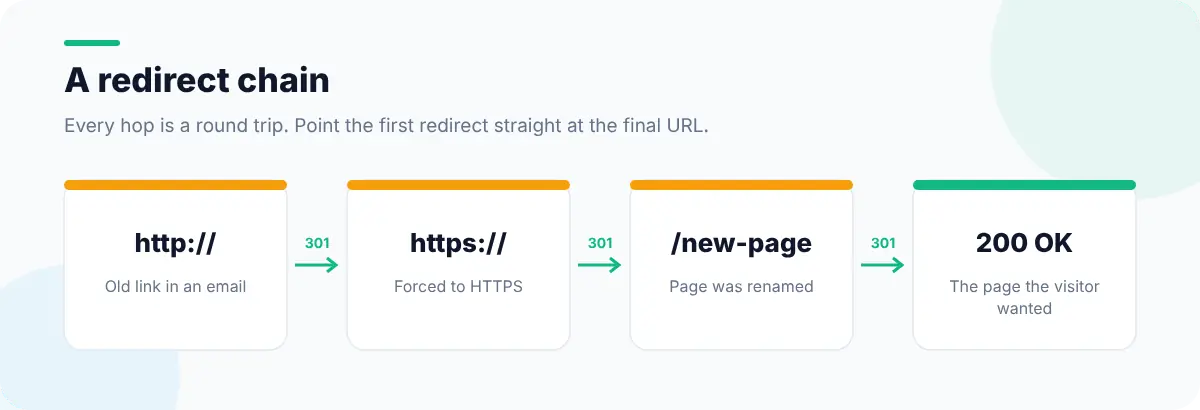
Chains build up over years: HTTP to HTTPS, then non-www to www, then an old slug to a new one. Each hop is a full round trip, which is most painful on slow mobile connections. The fix is simple once you can see them:
- Point every old URL directly at its final destination, in one hop.
- Update internal links to the final URL so visitors never hit a redirect at all. Internal Link Analyzer helps you find them.
- Keep the HTTP→HTTPS and host normalisation in one rule at the server or CDN.
- Re-check after each deploy; redirect rules are easy to break when configs change.
Loops, soft 404s and other traps
- Redirect loops (A → B → A) show as "too many redirects" in the browser. They usually come from two rules fighting, such as a CDN forcing HTTPS and an app forcing HTTP.
- Soft 404s are missing pages that return 200 with a "not found" message, or redirect everything to the home page. Search engines treat both as errors. Return a real 404 or 410.
- Temporary codes for permanent moves. A 302 left in place for a year tells search engines the old URL might come back.
- Redirecting to an irrelevant page. Sending every old product to the home page frustrates visitors; redirect to the closest equivalent.
After a migration: find the URLs you forgot
The hardest part of a migration is knowing every old URL. Your sitemap only lists current pages, and analytics only shows URLs that got traffic recently. Web archives remember far more: Web Archive Viewer's guide to finding every archived URL on a domain shows how to list old URLs, including ones that have since disappeared, so you can check each one redirects somewhere sensible. If links elsewhere are already broken, their guide to fixing link rot covers recovery.

For the headers themselves, read how to view HTTP headers in Chrome. Broken destinations show up in finding broken links and missing images, and redirects for HTTPS are covered in fixing mixed content.