You moved the site to HTTPS, the certificate is valid, and yet a page shows a warning, an image is missing or a script silently doesn't run. The cause is usually mixed content: an HTTPS page that loads something over plain HTTP.
Active vs passive mixed content
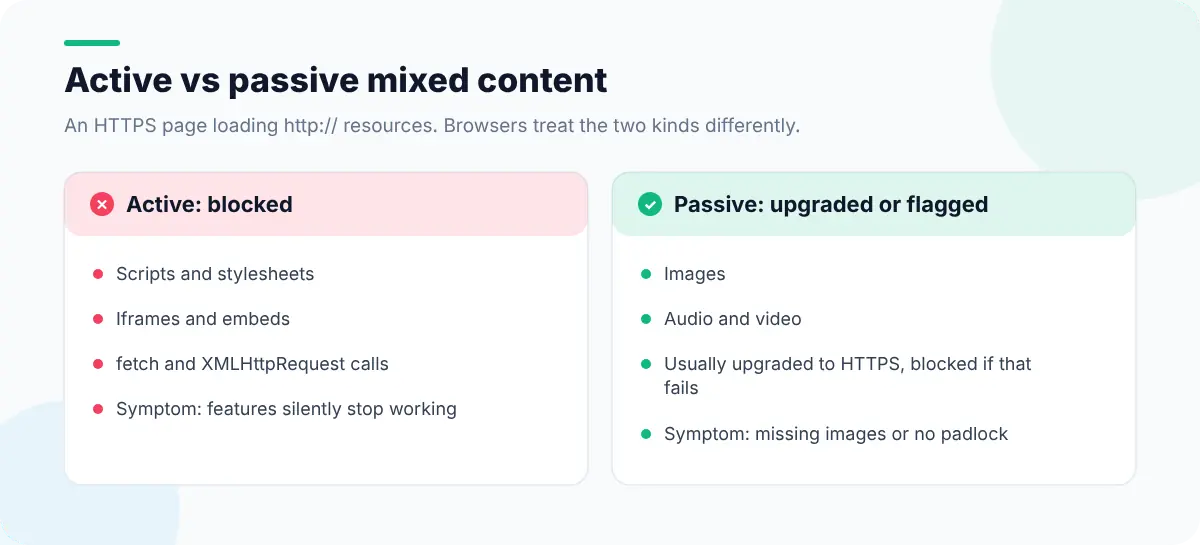
Browsers treat the two kinds differently:
- Active mixed content (scripts, stylesheets, iframes, fetch and XHR requests) can change the page, so modern browsers block it. The symptom is a feature that silently stops working.
- Passive mixed content (images, audio, video) can't change the page. Modern Chrome tries to load it over HTTPS automatically and blocks it if that fails; other browsers may load it but remove the secure padlock.
Step 1: Find it
- 1
Open the Console
Mixed content messages appear as warnings or errors naming each insecure URL and whether it was blocked.
- 2
Check the Security panel
In Chrome DevTools, the Security panel summarizes the page and lists non-secure origins.
- 3
Highlight it on the page
Web Developer Tools' Mixed Content Detector lists every HTTP resource, and Outline Non-Secure Elements draws a box around each one so you can see which component is responsible.
- 4
Check the whole site
Mixed content usually comes from templates, so check one page of each type: home, article, product, checkout.
// List resources the page loaded over plain HTTP
performance.getEntriesByType("resource")
  .map((r) => r.name)
  .filter((url) => url.startsWith("http:"));

// And hard-coded http:// URLs still in the markup
[...document.querySelectorAll("[src^='http:'], [href^='http:'], [srcset*='http:']")]Step 2: Fix it
| Where the http:// URL comes from | Fix |
|---|---|
| Hard-coded in templates or theme files | Change to https://, or use a relative path for your own assets |
| Stored in the database (CMS content, image URLs) | Run a careful search-and-replace on a backup, then re-check |
| A third-party script or embed | Use the provider's HTTPS URL; if they don't offer one, replace the provider |
CSS background-image or @import | Update the URLs inside the stylesheet |
srcset and responsive image sets | Every candidate URL needs HTTPS, not just src |
Step 3: Stop it coming back
Two response headers turn a one-off cleanup into a guarantee:
Content-Security-Policy: upgrade-insecure-requests
Strict-Transport-Security: max-age=31536000; includeSubDomains
upgrade-insecure-requests rewrites http:// subresources to https:// before they load. HSTS makes browsers use HTTPS for your domain.upgrade-insecure-requests only helps if the resource is actually available over HTTPS, so fix the URLs first and add the header as a safety net. Use Security Headers Checker, CSP Viewer and HSTS Checker in Web Developer Tools to confirm both headers are being sent, or read them yourself following how to view HTTP headers in Chrome.
Don't forget the redirects
Every http:// URL should 301-redirect to its https:// equivalent in a single hop. Long chains (http → https → www → trailing slash) slow every first visit. Our guide to checking redirects and HTTP status codes shows how to spot them.
Mixed content is one item in a broader review; the website security checks for developers cover cookies, headers and third-party scripts.