Meta tags are invisible on the page but they decide how it appears everywhere else: the blue link and snippet in search results, the card when someone shares it in a chat, and whether it gets indexed at all. They're also easy to get wrong, especially when templates and SEO plugins both set them.
The tags that matter
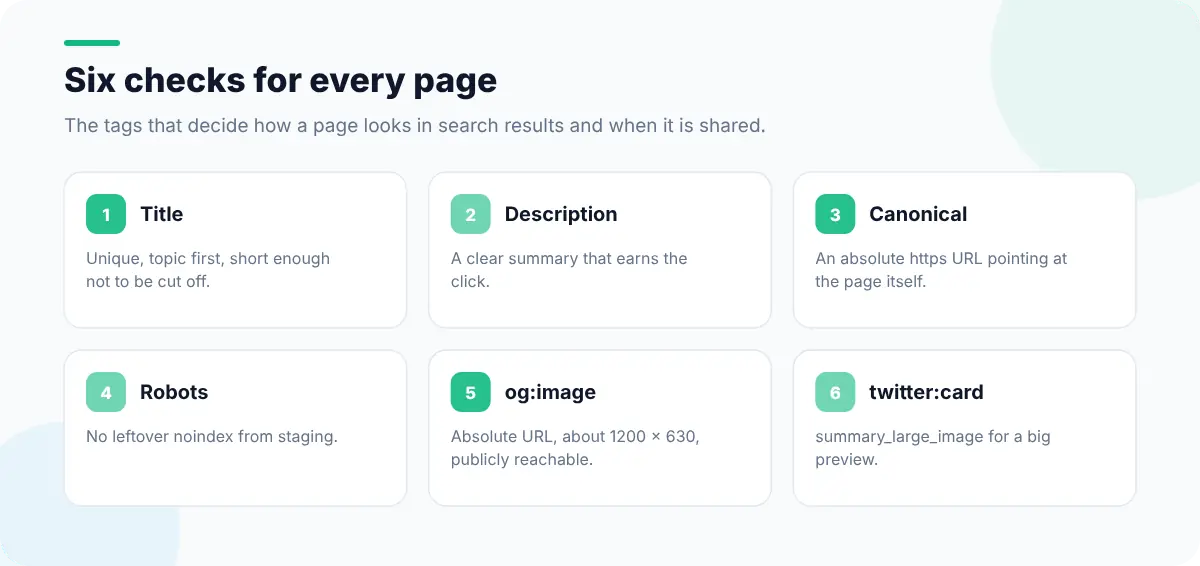
| Tag | What it controls | Common mistake |
|---|---|---|
<title> | The headline in search results and the browser tab | Same title on every page, or the brand name first |
<meta name="description"> | Often used as the search snippet | Missing, duplicated, or too long and cut off |
<link rel="canonical"> | The preferred URL for duplicate content | Pointing at the home page, or at an http:// or staging URL |
<meta name="robots"> | Whether the page is indexed and links followed | A leftover noindex from staging |
og:title, og:description, og:image | The preview card on social and chat apps | Missing image, or a relative image URL |
twitter:card | The card layout on X | Missing, so the link shows as plain text |
hreflang | Language and region alternates | Missing return links between alternates |
Check them by hand
View the source (Ctrl+U, Cmd+Option+U on a Mac) and search for <title, <meta and canonical. Note that this is the HTML the server sent. If a JavaScript framework changes tags after load, compare with the Elements panel in DevTools, which shows the live DOM. Search engines can render JavaScript, but tags present in the initial HTML are the safest.
// Quick audit in the Console
({
  title: document.title,
  titleLength: document.title.length,
  description: document.querySelector('meta[name="description"]')?.content,
  canonical: document.querySelector('link[rel="canonical"]')?.href,
  robots: document.querySelector('meta[name="robots"]')?.content ?? "(none)",
  og: [...document.querySelectorAll('meta[property^="og:"]')]
    .map((m) => [m.getAttribute("property"), m.content]),
});Check them with previews
Reading tags tells you what's there; a preview tells you how it looks. In Web Developer Tools:
- Meta Tags & Canonical lists every meta tag, the canonical and the robots directives.
- SERP Snippet Preview shows the title and description as they might appear in search results, and Meta Length Checker flags ones likely to be truncated.
- Open Graph & Twitter Cards renders the share card from the page's tags.
- Canonical Conflict Detector, Duplicate Canonical Tag Detector and Duplicate Meta Detector catch the template-plus-plugin problem of two tags disagreeing.
- Hreflang Viewer lists language alternates, and Structured Data Viewer shows JSON-LD.
Fix broken share previews
When a link shows up with no image or the wrong title, it's almost always one of these:
- 1`og:image` is a relative URL. It must be absolute:
https://example.com/share.png, not/share.png. - 2The image is too small or the wrong shape. About 1200 × 630 pixels works well across platforms.
- 3The image is blocked by
robots.txt, a login or hotlink protection, so the platform can't fetch it. - 4The platform has cached an old version. Most social platforms cache previews; their debugging tools let you request a fresh scrape.
- 5Tags are added by JavaScript. Many link-preview crawlers don't run scripts. Put social tags in the server-rendered HTML.
<title>How to Fix Mixed Content Warnings | Example</title>
<meta name="description" content="Find every insecure resource on an HTTPS page and fix it for good.">
<link rel="canonical" href="https://example.com/blog/mixed-content">
<meta property="og:type" content="article">
<meta property="og:title" content="How to Fix Mixed Content Warnings">
<meta property="og:description" content="Find every insecure resource on an HTTPS page and fix it for good.">
<meta property="og:image" content="https://example.com/og/mixed-content.png">
<meta name="twitter:card" content="summary_large_image">Writing titles and descriptions that work
- Unique per page. Templates should build titles from the page's own content.
- Most important words first. Put the topic before the brand name.
- Describe, then persuade. The description should say what's on the page and why it's worth the click.
- Match the content. If the snippet promises something the page doesn't deliver, search engines may rewrite it and readers will bounce.
Meta tags are one part of technical SEO; the technical SEO checklist for developers covers crawling, indexing and performance. If a canonical or redirect points somewhere unexpected, check the redirects and status codes next.