Most layout bugs are invisible. An element is a few pixels wider than its parent, a wrapper has unexpected padding, a modal sits under a sticky header. You can find them one element at a time in DevTools, or you can make the whole layout visible at once and let the problem jump out.
This guide is about the second approach: outlines and overlays that turn an invisible structure into something you can see.
The one-line trick, and why it's not enough
Every front-end developer has pasted this into the Styles pane at some point:
* { outline: 1px solid rgb(255 0 0 / 0.4); }outline doesn't take up space, so unlike border it won't change the layout you're debugging.It works, but every element gets the same color, so nested boxes blur together, and it's gone the moment you reload. Targeted outlines answer specific questions faster.
Ask the layout a specific question
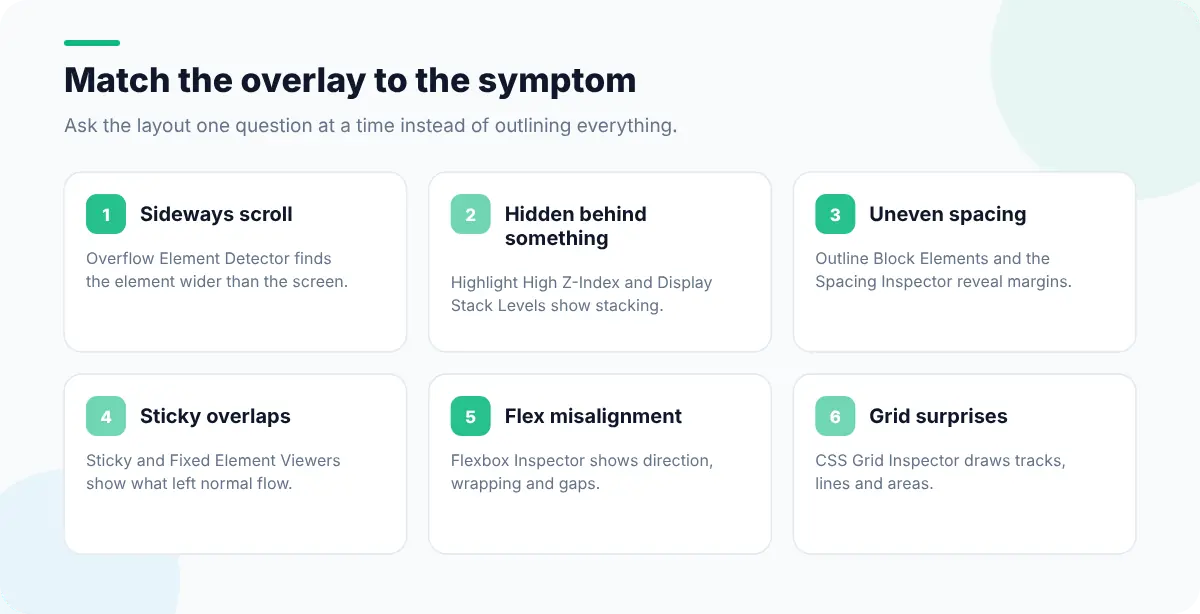
| Symptom | Overlay to use (Web Developer Tools) | What to look for |
|---|---|---|
| Page scrolls sideways on mobile | Overflow Element Detector | The highlighted element wider than the viewport |
| Something won't appear on top | Highlight High Z-Index, Display Stack Levels | Which elements create stacking contexts and at what level |
| Spacing looks uneven | Outline Block Elements, Spacing Inspector | Margins collapsing or padding you didn't expect |
| A sticky header covers content | Sticky Element Viewer, Fixed Element Viewer | Which elements are taken out of normal flow |
| Flex items won't line up | Flexbox Inspector | Container direction, wrapping, gaps and item sizes |
| Grid tracks look wrong | CSS Grid Inspector | Track lines, areas and gaps |
Find the element causing horizontal scroll
The classic mobile bug. The page is 375px wide but something is 380px, so everything wobbles sideways. To find it by hand, run this in the Console:
const vw = document.documentElement.clientWidth;
[...document.querySelectorAll("*")]
  .filter((el) => el.getBoundingClientRect().right > vw + 1)
  .forEach((el) => {
    el.style.outline = "2px solid magenta";
    console.log(el);
});Usual suspects: an image without max-width: 100%, a long URL or word that can't wrap (overflow-wrap: anywhere fixes it), a 100vw width that ignores the scrollbar, or negative margins on a full-bleed section. The Overflow Element Detector does the same check in one click.
Untangle z-index and stacking contexts
z-index: 9999 not working is almost never about the number. A new stacking context is created by position with a z-index, but also by opacity below 1, transform, filter, isolation: isolate and several other properties. A child can never escape its parent's stacking context, however high its z-index.
- 1
Show the stack
Use Highlight High Z-Index or Display Stack Levels to see which elements have a z-index and where contexts start.
- 2
Find the parent context
Walk up from the element that's hidden. The first ancestor with a transform, opacity or z-index is the ceiling.
- 3
Fix at the right level
Raise the ancestor, move the element out (a portal for modals), or remove the property that created the context.
Inspect flex and grid containers
Chrome and Firefox both show a small flex or grid badge next to containers in the Elements panel; click it to draw an overlay with lines, gaps and areas. The Flexbox and CSS Grid Inspectors in Web Developer Tools list every flex and grid container on the page at once, which is useful when you don't yet know which wrapper is responsible.
Strip styles to find the culprit
When you can't tell which stylesheet is responsible, remove them in layers. Disable Linked Stylesheets shows the page without external CSS, Disable Inline Styles removes style attributes, and Disable All Styles shows the raw document. If the bug disappears at one step, you know where to look. CSS Specificity Viewer and Highlight !important Rules then show which rules are winning.
For bugs that come down to the cascade rather than layout, the CSS debugging guide covers specificity and inheritance. To check the fix at every width, follow how to test responsive design, and to check exact sizes, read how to measure elements on a web page.